
VPS servers (Virtual Private Servers) have become one of the most widely used infrastructure solutions for modern businesses, developers, SaaS platforms, and hosting providers.
It offers a balance between affordability, performance, and flexibility by combining dedicated-like resources with virtualization technology.
Unlike shared hosting, where multiple users compete for the same resources, a VPS provides isolated CPU, RAM, and storage allocation, ensuring predictable performance and higher stability.
At RootHosts, VPS infrastructure is built on high-performance virtualization environments designed for speed, scalability, and long-term reliability.
What Is a VPS Server?
A Virtual Private Server (VPS) is a virtualized server created inside a physical machine using virtualization technologies such as KVM or container-based systems.
Each VPS acts as an independent server environment with its own:
- CPU allocation
- RAM allocation
- Storage space
- Operating system
- Network configuration
This isolation allows users to run applications and services without interference from other users on the same physical host.
VPS Servers vs Shared Hosting
Shared hosting:
- Limited performance
- Shared resources
- Lower control
- Not suitable for heavy applications
VPS servers:
- Dedicated virtual resources
- Full root access
- Higher stability
- Better scalability
VPS vs Dedicated Server
Dedicated server:
- Full physical hardware
- Higher cost
- Maximum performance
VPS:
- Virtualized environment
- Lower cost
- Flexible scaling
Why VPS Servers Are Important
Modern applications require stable and predictable infrastructure. VPS servers solve key limitations of shared hosting by offering controlled environments with guaranteed resources.
Key advantages:
- Resource Isolation — Each VPS runs independently, meaning other users cannot affect your performance.
- Scalability — Resources such as CPU, RAM, and storage can be upgraded as your project grows.
- Full Control — Root access allows complete control over the operating system and installed services.
- Performance Stability — Workloads remain consistent even under traffic spikes.
- Security Separation — Each VPS is isolated, reducing risk from neighboring environments.
VPS Server Use Cases
VPS servers are widely used across multiple industries.
Web Applications — Hosting scalable web applications and APIs with consistent performance.
SaaS Platforms — Running backend services, databases, and application logic.
Development Environments — Testing and staging environments for developers.
Game Servers — Hosting multiplayer game servers requiring low latency.
E-commerce Platforms — Running online stores with stable uptime requirements.
VPN & Security Systems — Creating secure private networks and tunneling systems.
Backup & Storage Nodes — Dedicated backup infrastructure for data redundancy.
VPS Architecture & Virtualization Technology
VPS environments are built using virtualization layers that separate physical hardware from virtual machines.
Common technologies include:
- KVM virtualization
- QEMU hypervisor
- LXC containers
- Kernel-level resource isolation
Each VPS receives virtual hardware abstraction while still relying on the physical host machine.
Key technical components:
- CPU scheduler allocation
- Memory ballooning
- Virtual network interfaces
- Block storage systems
- Hypervisor management layer
This architecture ensures stability, isolation, and predictable performance.
Performance Optimization in VPS Environments
VPS performance depends on both virtualization quality and system-level optimization.
CPU Optimization — Efficient CPU scheduling ensures fair resource distribution across virtual machines.
Memory Management — Proper RAM allocation prevents swapping and system slowdown.
Storage Optimization — NVMe or SSD-based storage improves I/O performance significantly.
Network Optimization — Low-latency networking ensures fast response times for applications.
System Tuning — Kernel parameters and service configurations can improve overall performance.
Related infrastructure services:
VPS Security Best Practices
Security is a critical component of VPS servers. Even though VPS environments are isolated, proper configuration is still essential.
Core security practices:
- SSH key authentication
- Firewall configuration (iptables / nftables)
- Regular OS updates
- Fail2Ban protection
- Access control policies
- Service isolation
- Secure backups
Advanced protection layers:
Security should always be implemented in multiple layers, not just at server level.
VPS Monitoring & Reliability
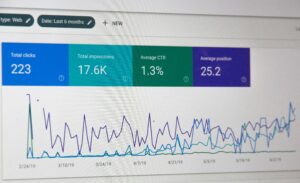
Monitoring ensures that VPS environments remain stable and predictable under load.
Key metrics include:
- CPU usage
- RAM consumption
- Disk I/O performance
- Network traffic
- Load average
- Service uptime
- Application latency
Monitoring helps detect issues before they become critical failures. Advanced systems can also include alerting and predictive analysis to prevent downtime.
VPS Scaling & Infrastructure Growth
One of the biggest advantages of VPS servers is scalability. As your project grows, infrastructure can be expanded without migration to new physical servers.
Scaling options:
- Increase CPU cores
- Add more RAM
- Expand storage
- Upgrade network capacity
- Move to cluster-based VPS systems
For larger infrastructures, VPS systems can be integrated into virtualization clusters such as Proxmox or cloud platforms.
Managed VPS vs Unmanaged VPS
Unmanaged VPS
- Full responsibility on user
- Requires Linux knowledge
- Lower cost
- No technical support
Managed VPS
- Server administration included
- Security updates handled
- Monitoring included
- Performance optimization
- Troubleshooting support
At RootHosts, VPS environments can be combined with:
- Linux Server Administration
- Infrastructure Monitoring
- Security hardening
- Backup systems
When Do You Need a VPS Server?
You should consider a VPS server if:
- Shared hosting is too slow or limited
- Your application requires custom configuration
- You need root access
- You run production workloads
- You expect traffic growth
- You need better security isolation
VPS is often the first step between shared hosting and full dedicated infrastructure.
Why Choose RootHosts VPS Infrastructure

RootHosts VPS environments are designed for stability, performance, and long-term scalability.
We focus on:
- High-performance virtualization
- Secure infrastructure design
- Optimized resource allocation
- Continuous monitoring
- Reliable uptime performance
Our infrastructure approach combines:
- VPS Hosting Services
- Linux Server Administration
- Infrastructure Monitoring
- Security systems
- Backup solutions
Explore VPS solutions: VPS Hosting Services
Conclusion
VPS servers are one of the most flexible and powerful infrastructure solutions available today. They provide the perfect balance between performance, scalability, and cost efficiency.
With proper configuration, monitoring, and security, VPS environments can support everything from small websites to enterprise-level applications. Professional management ensures stability, reduced downtime, and optimal performance under load.
Learn more: VPS Hosting Services & Plans